
At a car audio installation handover, compare the completed work with the agreed scope. With the car parked, check your usual music sources, both sides of a phone call, navigation prompts, retained vehicle sounds and controls. Inspect the reassembled interior and ask for a demonstration of operation and the saved configuration. Mark each item as checked, needing clarification or untested. Music playing on its own does not confirm the whole integration.
Start with the work you actually commissioned
Bring the quote or agreed work list, your own phone and a few familiar recordings. Note what was replaced, what remained factory fitted and which limitations were agreed. Front speaker replacement, adding a subwoofer and changing the amplification need different handover checks. Do not retrospectively add functions that were outside the project.
Separate operation from preference: missing call audio is a functional problem; wanting slightly softer treble needs a discussion about sound. Establish which components the installer can show without dismantling anything. The sheet below is an owner's tool, rather than a statement of the studio's standard package or procedure.
Handover sheet: check, result and next action
Copy this table into a note. For each row, enter checked, question, untested or not applicable. In the final column, record the symptom and agreed next step: who will check it, under what conditions and when you will revisit it. An unperformed test should not receive a pass.
| Area | Test / criterion | Result | Next action |
|---|---|---|---|
| Work scope | Models and changes match the agreement; deviations are explained | ___ | ___ |
| Music sources | Each source you use plays audio and works when selected again | ___ | ___ |
| Controls | Volume, mute, steering wheel buttons and added controller work as agreed | ___ | ___ |
| Call and navigation | Both callers and the prompt are audible; music resumes afterwards | ___ | ___ |
| Vehicle functions | Retained messages, sounds and menus have an appropriate demonstration | ___ | ___ |
| Listening | Agreed preset, normal volume, no new pops or dropouts | ___ | ___ |
| Interior and access | Windows, locks, seats and required storage work; trim is reassembled | ___ | ___ |
| Restart | Audio and the intended preset return after normal shutdown and restart | ___ | ___ |
| Documentation | Equipment and control descriptions, available setup backup and open questions | ___ | ___ |
How do you check calls, vehicle sounds and controls?
With the car parked, switch between the sources you use, such as radio and phone. Make a normal call: ask the other person to assess your microphone audio and listen to their voice yourself. Separately play a navigation prompt using an available system function. Check that music resumes after the call and prompt. Working Bluetooth music does not complete the call check.
Try the steering wheel buttons and the new controller: establish what the knob changes, how to select a preset and how to return to the previous one. Do not assume every knob controls bass alone. Ask the installer to demonstrate retained parking or warning sounds using a safe method provided for the vehicle. Do not drive towards an obstacle or create a dangerous situation to trigger a sound. If it cannot be demonstrated, record it as untested and agree a verification method.
What can you inspect without dismantling the car?
Inspect the areas worked on: door card, cover and sill trim fit, upholstery condition, and access to storage and boot equipment. Carefully check window and seat movement; stop if there is new resistance or noise. Visible wiring should not enter moving mechanisms. Ask to see how an accessible subwoofer enclosure is secured and where the equipment is located, without pulling wiring looms.
Listening alone cannot assess a concealed installation. Ask about photographs taken before the trim was fitted, the power route, protection locations and service access. Selection requires the specific equipment and cable documentation; do not copy a fuse rating from another car. Do not open housings, unplug connectors or adjust live terminals. Leave electrical installation and measurements to the installer.
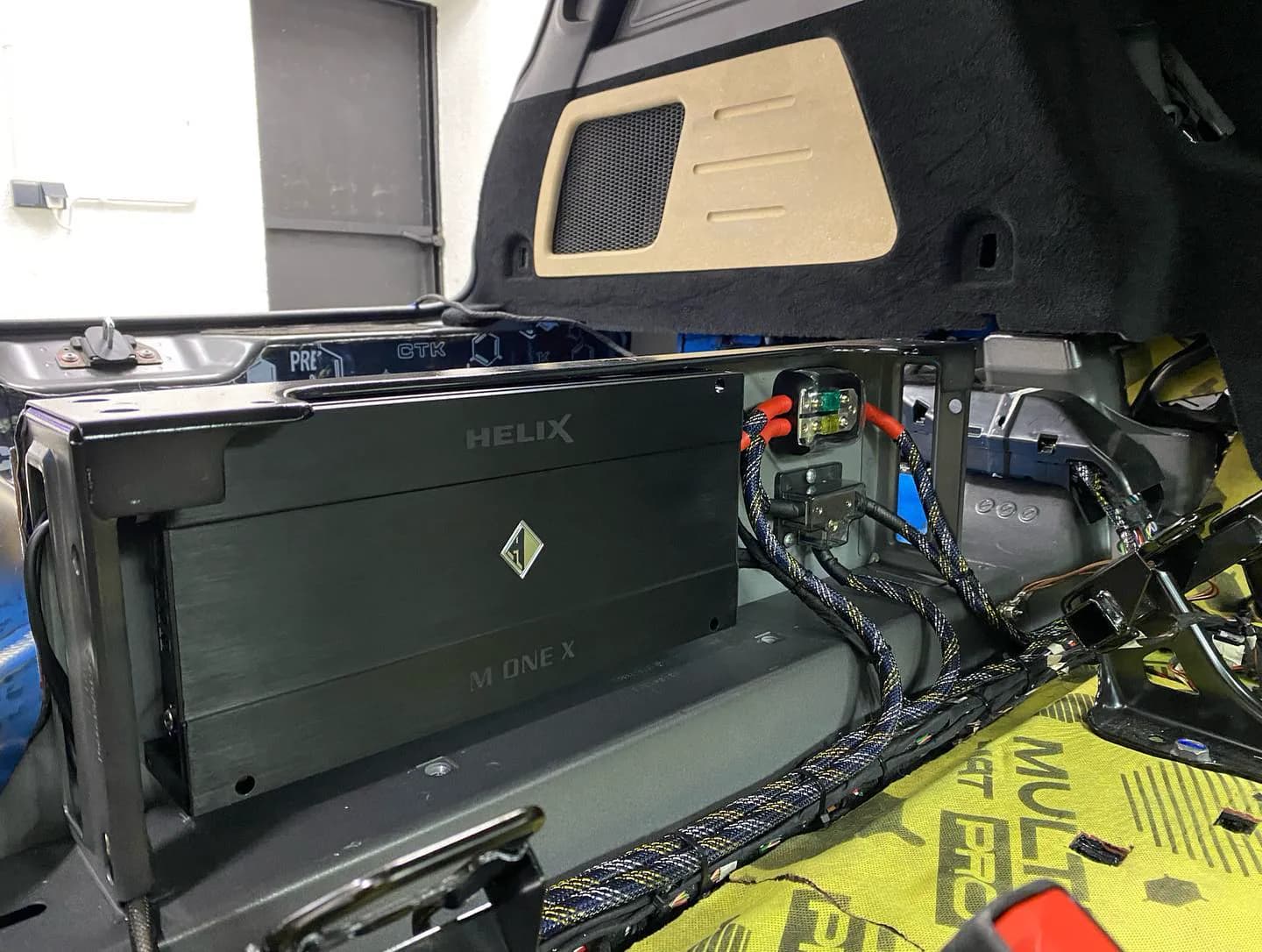
The Mercedes GLE project photograph shows the amplifier and wiring before the side recess was covered. Documentation like this can help locate components later. A photograph does not establish that electrical checks were performed or show what is in your own car.
Which configuration details should you keep?
Ask for a list of models, their roles and locations, an explanation of the controls and where to obtain the correct instructions. If the system has a DSP — a digital signal processor — note the active preset's name, the purpose of the others and how to select them. Establish whether you will receive a final configuration backup and who stores it. Record the file date and the device it belongs to.
A backup file and settings stored in the device are separate things to confirm. Audiotec Fischer's documentation describes Save & Store saving a configuration on the computer and in DSP memory. The procedure depends on the device and software version. Ask for confirmation that it is saved and a demonstration after restarting, rather than resetting the processor yourself or loading someone else's preset.
Assess the sound in the setting you will use
Sit in the agreed listening position and play familiar recordings at normal volume. Check voice clarity, bass integration with the front speakers and any new trim vibrations. If listening for two people was agreed, assess the passenger seat too. Ask to see the normal adjustment method; do not test system capability by turning it up to maximum.
Instead of writing only ‘sounds wrong’, note the track, passage, source, preset and seat. Tuning and diagnosing a particular problem need more detailed checks. Functional handover does not replace measurement or demonstrate an objective improvement in every parameter.
What happens to an untested item or a later symptom?
A short shutdown test does not establish correct current draw after the car goes to sleep. Equipment can have different delays and power-saving modes; an extinguished indicator is not a measurement. If there is a battery concern, agree a current-draw check after sleep under the conditions appropriate to the vehicle. Do not apply one number of minutes to every system.
A conditional example entry: ‘Phone reconnection after a long stop — untested. Owner to note parking duration and source; installer to agree a symptom reproduction test.’ This is a note template, rather than a completed service result. If new pops, dropouts or system shutdown occur, do not raise the volume hoping they will disappear. Record the circumstances and contact the installer. Keep open items with the work scope and documents.
Questions and answers
Can I check every speaker separately with the fader?
Not always. A fader adjusts the front-to-rear relationship, rather than each driver. Integration can also limit its operation: the HELIX SDMI25, for example, passes stereo without fader information. Establish the retained controls and ask for a channel demonstration appropriate to the configuration. Do not try to restore the slider through arbitrary DSP routing changes.
Should I bring test signals downloaded from the internet?
Familiar music and your own phone are enough for basic handover. Leave measurements and test signals to someone who knows the configuration. Incorrect filters can damage a driver, particularly in an active system. Do not disable filters or protection to check whether every driver plays the whole frequency range.
What if I have no recording or measurement from before installation?
You can still check the work scope, controls, retained functions and present operation. You cannot obtain a reliable before-and-after comparison from memory or a video made under different conditions. In the sheet, separate your assessment of current operation from an undocumented degree of improvement.
Plan the installation and your car audio handover
Prepare the audio system version, your intended result and the functions you want to retain. The service page form creates a description to copy or download; it does not send a message itself.